Topic: Sales share of vehicles Subscribe | Previous | Next
Siddiqua Mahmud 11/7/2019
hi Everybody,
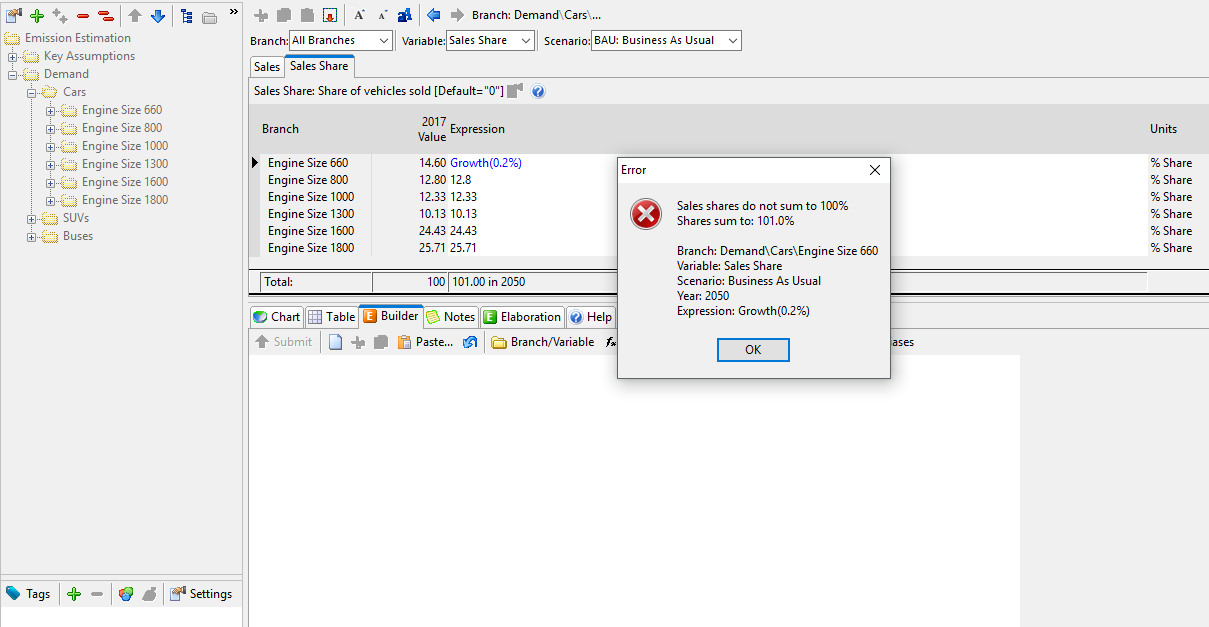
I'm having difficulty in the input of sales share data of the vehicles. By giving the growth rate, it gives an error that the amount should not be greater than 100%.
SS is attached for further details.
Kindly reply me
Charlie Heaps 11/7/2019


LEAP is trying to help you out by telling you that you have specified an inconsistent set of values there.
You need to make sure that the shares add up to 100% across every year of your analysis. If they add up to 100% in the base year and you then tell one of the values to grow, they won't add up to 100% in later years. To solve this, you can specify one of the values using the "Remainder(100)" expression. This will cause that value to decrease as others increase. However, in general, it is NOT good practice to apply a percentage growth rate to values that are already specified as percentages. You run the risk that values will grow beyond 100%.
Siddiqua Mahmud 11/13/2019
Thank you for your kind reply Sir.
I don't understand your point. You are saying that i should make an expression Remainder(100) to anyone of these values? Rest will remain as they are? I set the one value Engine size 660 by Remainder(100) expression but it shows no change in the value up to 2050. How can I properly use this expression?
Screenshot is attached for further details.
I shall be very thankful to you Sir.
.png)
Emily Ghosh 11/19/2019

Hi Siddiqua,
As Charlie noted, the % share value across all branches needs to add up to 100% across all years. In the screenshot provided in your first post, you added a growth rate to the branch named "Engine Size 660". By adding this growth rate, the initial sales share of 14.6% for vehicles with an Engine Size of 660 increases by 0.2% per year. If the sales share for this type of vehicle is increasing, the sales share for another type of vehicle must decrease in order for the total sales share across all vehicles to equal 100%.
So, you can keep the expression "Growth(0.2%)" in the Engine Size 660 branch, but then you can use the "Remainder(100)" expression on the vehicle branch that is expected to decrease its shares. This will ensure that the total share equals to 100%.
Hope this helps,
Emily
Siddiqua Mahmud 1/27/2020
I tried the same but the error occurred which is shown below in the screenshot of the LEAP.
Kindly help me.
Regards.
(1).png)
Charlie Heaps 1/27/2020

1 Like Hi again - As you can see, the negative value is for the branch with the Remainder(100) function. Because the other values all add up to more than 100% in future years, that forces the remainder function to yield a negative result (because it is defined as 100 minus the sum of all the other neighboring branches). This causes LEAP to report an error (because shares are not allowed to be less than zero).
As I mentioned earlier, it is bad practice to apply growth rates to values that are already expressed as percentage values. Doing things this way makes it very hard to ensure that the sum of all the values adds up to 100%. LEAP is trying to help you with this message by telling you that you have put in invalid values. It is up to you to make sure: (1) that neighboring values sum up to 100% AND (b) that all the values are between 0 and 100%.
Siddiqua Mahmud 2/12/2020
Thank you Sir. I got your point. But if i want to give some formula to calculate the growth rate for future years, what should i do then?